
Importing ARCOS Data with Dask#
Last week, we used dask to play with a few datasets to get a feel for how dask works. In order to help us develop code that would run quickly, however, we worked with very small, safe datasets.
Today, we will continue to work with dask, but this time using much larger datasets. This means that (a) doing things incorrectly may lead to your computer crashing (So save all your open files before you start!), and (b) many of the commands you are being asked run will take several minutes each.
For familiarity, and so you can see what advantages dask can bring to your workflow, today we’ll be working with the DEA ARCOS drug shipment database published by the Washington Post! However, to strike a balance between size and speed, we’ll be working with a slightly thinned version that has only the last two years of data, instead of all six.
Exercise 1#
Download the thinned ARCOS data from this link. It should be about 2GB zipped, 25 GB unzipped.
Note: On windows, it seems you will probably need to unzip the file on the command line to avoid getting an “unspecified error.” In your git-bash/bash terminal, navigate to where you downloaded the file and run unzip arcos_2011_212.tsv.zip. It’ll seem to hang for a while, but it’s working!
Exercise 2#
Our goal today is going to be to find the pharmaceutical company that has shipped the most opioids (MME_Conversion_Factor * CALC_BASE_WT_IN_GM) in the US.
When working with large datasets, it is good practice to begin by prototyping your code with a subset of your data. So begin by using pandas to read in the first 100,000 lines of the ARCOS data and write pandas code to compute the shipments from each shipper (the group that reported the shipment).
Exercise 3#
Now let’s turn to dask. Re-write your code for dask, and calculate the total shipments (in milligrams of morphine equivalents) by reporting company. Remember:
Activate a conda environment with a clean dask installation.
Start by spinning up a distributed cluster.
Dask won’t read compressed files, so you have to unzip your ARCOS data.
Start your cluster in a cell all by itself since you don’t want to keep re-running the “start a cluster” code.
If you need to review dask basic code, check here.
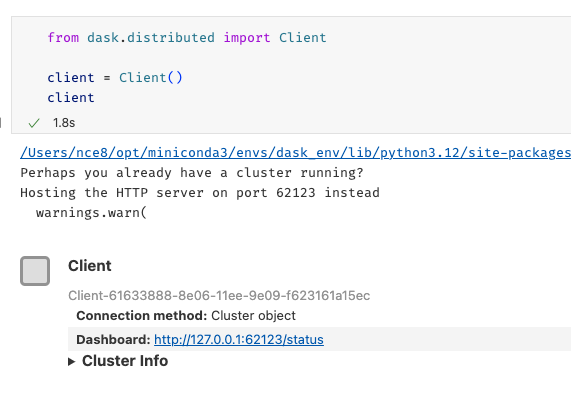
As you run your code, make sure to click on the Dashboard link below where you created your cluster:
Among other things, the bar across the bottom should give you a sense of how long your task will take:
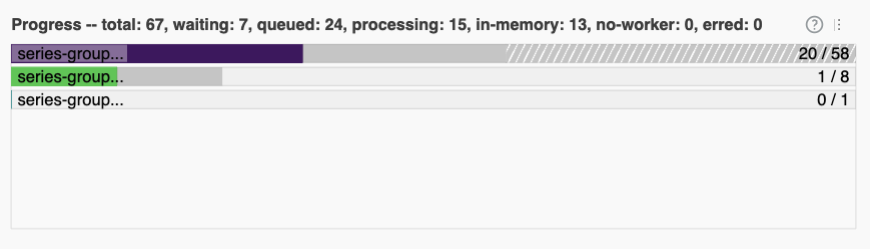
(For context, my computer (which has 10 cores) only took a couple seconds. My computer is fast, but most computers should be done within a couple minutes, tops).
Exercise 4#
Now let’s calculate, for each state, what company shipped the most opioids to that state?
Note you will quickly find that you can’t sort in dask – sorting in parallel is really tricky! So you’ll have to work around that. Do what you need to do on the big dataset first, then compute it all so you get it as a regular pandas dataframe, then finish.
If you get a ValueError, it’s probably that classic dask problem where it guesses at the type of a column based on the early rows, then later finds its guess was wrong. Remember: dask will give you advice at the end of the error message on one way to solve the problem! You may have to unfold the error in VS Code if VS Code collapsed the output by clicking “make scrollable element.”
Note further this error can occur repeatedly: first, it discovers at chunk 100 that its guesses for some columns were wrong. So you fix it, and it gets further, and discovers at chunk 200 another guess was wrong, so you have to fix that, etc.
Does this seem like a situation where a single company is responsible for the opioid epidemic?
Exercise 5#
Now go ahead and, using the ORIGINAL RAW ARCOS data from here. The dataset should be about 18gb zipped, 245gb unzipped.
Import the data, collapsing to one row per county-year. The only outcome you need to track is total milligrams of morphine equivalent received. If you are aware of how you might want to filter this raw data, please also do that (don’t worry too much for this exercise if you don’t.)
(If you are in IDS 720, you’ll recognize this is what you did by hand for the opioid project)
WARNING: You will probably run into a lot of type errors (depending on how the ARCOS data has changed since last year). With real world messy data one of the biggest problems with dask is that it struggles if halfway through dataset it discovers that the column it thought was floats contains text. That’s why, in the dask reading, I specified the column type for so many columns as objects explicitly. Then, because occasionally there data cleanliness issues, I had to do some converting data types by hand.